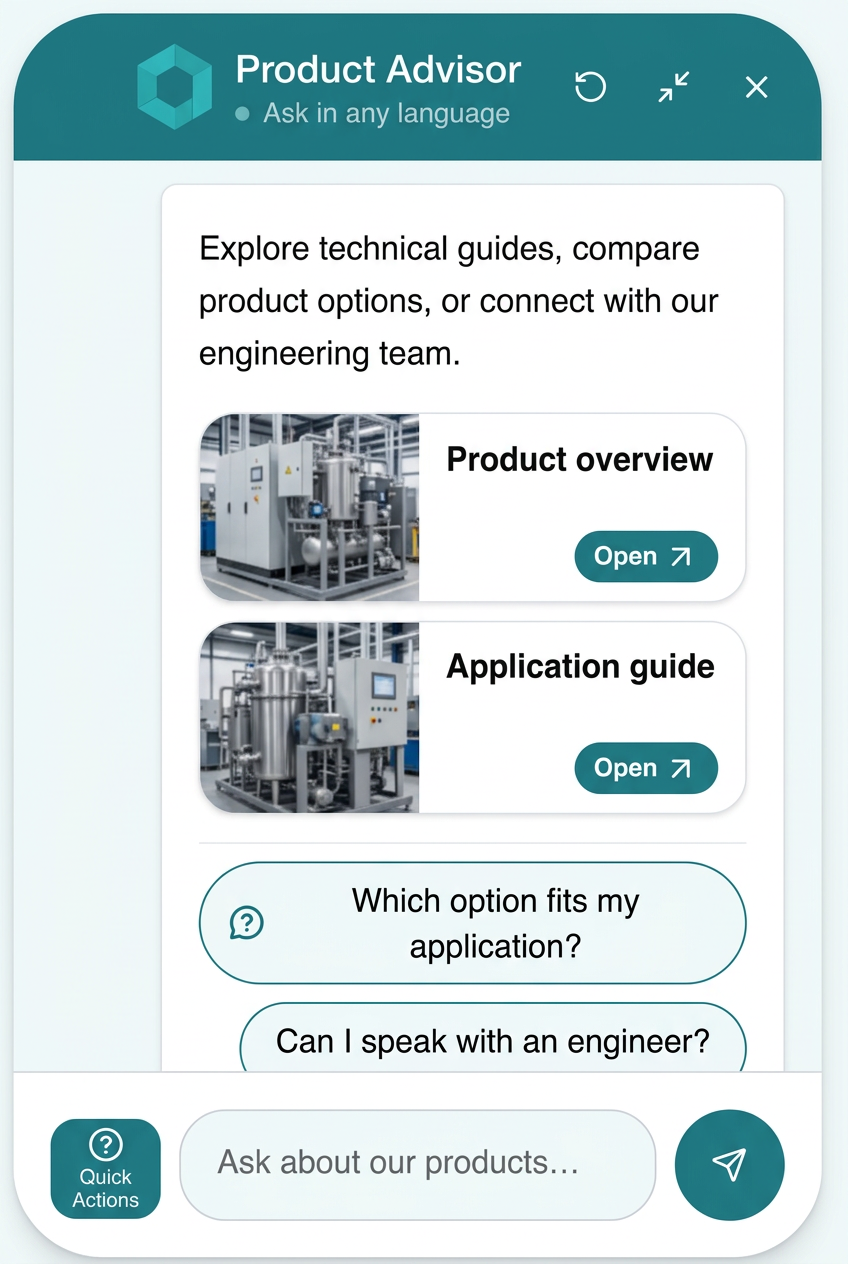
Your visitors don't click around a website any more — they ask. Gemma360 answers from your content and takes them straight to the page, product or person they came for.
Help prospects, shoppers and customers find the right answers, explore products and reach the right expert — in seconds, day or night. Built around your content, your brand and knowing when a person should take over, so the routine questions never reach your team's inbox.
Answers strictly from your approved content — tested before launch, with zero guessed facts.

Built different
Most chat tools started as ticket queues and scripted menus, then added a language model on top. Gemma360 was built from scratch in 2026 with AI in its foundations — so grounding, safety and automation work together instead of fighting each other.
Not another chat bubble
A few of the styles you can switch between in seconds. There are more — we're saving those for the demo.
Frosted, floating, on-brand
Product cards right in chat
Docked, draggable, unobtrusive
Talk instead of type
A peek behind the curtain
Guided tasks like logging a case — reliable, testable, never improvised.
Reach out at the right moment on the pages that matter most.
See how many chats the assistant resolved and the hours it saved.
Hardened against catalog scraping and competitor fishing.
More is on the way. Join the beta to see it first.
Visitors get a real reply the moment they ask — no contact form to fill in, no waiting for the next business day.
Nights, weekends, holidays and busy seasons keep getting answered. Nobody has to be at a desk for a question to be handled.
Replies carry the link to the exact page or product, and suggested buttons point at what your visitor came for — no menu digging.
The routine questions are settled in chat, so your people spend their time on the conversations that need a person.
From first question to next step
Product discovery, honest limits, useful media and a human when it matters — for retail, services and technical businesses.
Gemma
Your website. Your voice.

Grounded, not generated
Your assistant works from the pages and documents you approve — not the open internet, and not a guess. It finds the relevant part of your content, answers from it, and stops there.
Every reply starts with a search across your imported pages and documents, so the answer is built from what you published.
Topics outside your approved content aren't its business. No product claims you didn't write, no prices you didn't publish.
If your content doesn't cover it, the assistant tells your visitor plainly and offers a follow-up or your team — never a guess dressed up as fact.
This is retrieval-grounded answering: the assistant retrieves from your content and replies from what it finds, rather than generating from general knowledge. Nothing is invented to fill a gap.
Import website pages and documents, include relevant video links, and refresh on a schedule. Choose which pages belong in your knowledge base — and which don't.
Ground answers in your approved content. When details are missing, acknowledge the limit, ask a useful follow-up or offer a path to your team.
See recurring questions and missing information. Give a short instruction or point to a product page; AI drafts guidance for you to review and save.
Enable safeguards against bulk customer and supplier extraction, review outside-company mentions and keep inappropriate content out of your knowledge base.
Hand off with visitor details and conversation context. Your team replies from Slack while the visitor stays in chat. More handoff integrations are planned.
Replies in the language your visitor writes in, with the tone and style you choose.
Pull your logo, colors and fonts directly from your website, then fine-tune them. Make the assistant feel like part of your business, not an add-on.
Generate relevant button labels and questions from your knowledge base. Review and enable the ones that help visitors explore products, find answers or take the next step.
Bring relevant videos into answers and connect Calendly for meeting booking. Help shoppers explore a product or prospects get time with an expert.
Enable a camera button beside the chat input. Open your Google Meet link in a new tab or explore the Jitsi Meet beta option — separate from Calendly booking and Slack handoff.
Why Gemma360 is different
A fluent reply isn't enough. Gemma360 combines answers grounded in your approved content with brand safeguards, pre-launch testing and human handoff — and points every visitor straight at the page, product or person they came for. Teach what is missing, track running costs and keep your team in control.
The problem:Many chat widgets will list full catalogs, suppliers and customer names to anyone who asks.
With Gemma360:Anti-scraping mode and company screening keep proprietary relationships and website internals private.
The problem:Most tools leave you testing on real visitors or clicking through chats by hand.
With Gemma360:Automated, graded tests check answers against real visitor questions and flag weak spots before launch.
The problem:Typical bots invent plausible answers or hit visitors with robotic dead ends.
With Gemma360:Natural replies when information is missing, useful follow-ups and instant handoff to your team in Slack.
| Capability | Generic AI chatbots | Traditional enterprise suites | Gemma360 |
|---|---|---|---|
| Where answers come from | Your pages blended with public internet knowledge | Broad content libraries and scripted flows | Only your approved pages and documents |
| Made-up answers | Plausible replies even when the facts are missing | Canned fallbacks and dead ends | Says what isn't available and offers a next step |
| Data protection & anti-scraping | Readily shares catalogs and supplier lists | Basic filters with limited visibility | Anti-scraping mode and company screening |
| Testing before launch | Manual trial and error on live visitors | Complex tooling, often enterprise-only | Automated, graded test runs built in |
| Handling knowledge gaps | Guesses or repeats canned errors | Routes visitors into ticket queues | Honest replies, follow-ups and Slack handoff |
| Fixing answers | Re-upload or re-crawl the whole site | Intent training and flow builders | Teach AI: a short note or a page link |
| Visitor actions | Plain text and links | Custom development required | Video, Calendly booking and quick actions |
| Getting to the right page | Text answers with the odd link | Menus, search bars and scripted paths | Answers link straight to that page or product |
| Cost transparency | Message caps and sudden plan jumps | Per-resolution fees that grow with traffic | Per-bot usage and cost tracking |
| Backups & data retention | Rarely available | Usually top-tier contracts only | Automatic backups and retention controls |
Comparison reflects typical capabilities by category; individual products vary.
Optional video / web calls
Turn on the Video / Web Call Button in your bot settings to show a camera button beside the message input. Give visitors another way to connect when a product, application or technical question needs a conversation.
Google Meet
Zoom
ScreenMeet
Jitsi Meet
Paste your Google Meet, Zoom or ScreenMeet room link in bot settings and the chat opens it in a new tab. With no link, the Jitsi beta option opens a shared demo room. No account connection or automatic meeting creation is needed.
Access and admission are controlled by your meeting host settings. The shared Jitsi demo room is not private per visitor and is not suitable for confidential discussions. No option automatically brings an agent into the call — use Slack for handoff or Calendly to arrange a time.
Product images, embedded videos and richer answers when seeing is understanding.
Clear explanations and useful links, with less visual clutter.
A friendly back-and-forth that feels direct, not scripted.
Brief replies and relevant buttons for visitors who want to get moving.
From online stores to company websites, add one embed snippet wherever your platform supports custom JavaScript. No website migration needed.
Custom-code access may depend on your website plan and security settings. Gemma360 answers from imported content; it doesn't automatically access live inventory or private order records.
Import your website and select the pages and documents you want your assistant to use.
Pull branding from your site, choose a conversation style, review suggested actions and test the answers.
Add the snippet, connect Slack or your booking link, and learn from real conversations.
We're onboarding a limited number of companies personally.